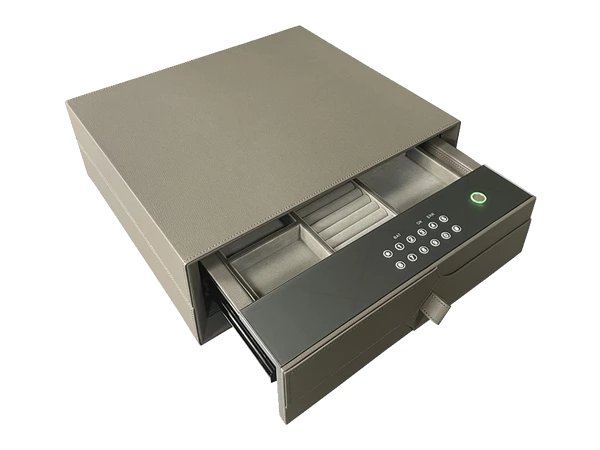
Why Choose a 2 Drawer Leather Safe Cabinet with Lock?
Secure storage does not always need to look like a traditional industrial safe. In bedrooms, walk-in wardrobes, private offices and other refined interiors, many homeowners prefer a storage solution that protects important belongings without introducing a large exposed steel box into the room.A 2 drawer leather safe cabinet with lock is designed for exactly this type of environment. It combines secure access with two separate storage sections and a furniture-friendly leather or microfiber exterior. The result is a safe that can hold documents, watches, jewelry, cash and other personal valuables while fitting more naturally into modern residential interiors.The two-drawer format is also practical. Instead of placing everything inside one large compartment, users can separate frequently accessed valuables from documents or other items that need less regular access. For buyers who care about organization as much as security, this can make everyday use considerably easier.
What Is a 2 Drawer Leather Safe Cabinet?
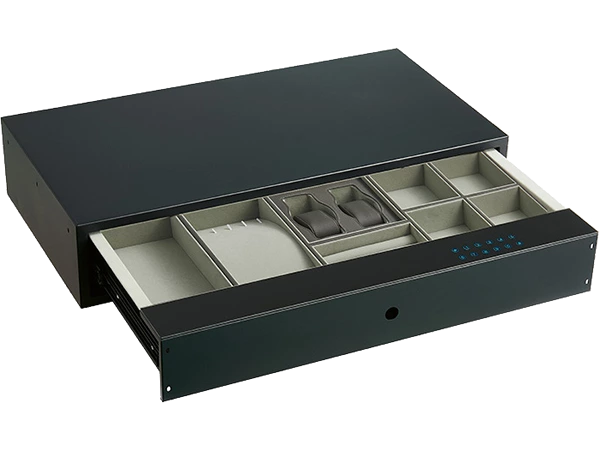
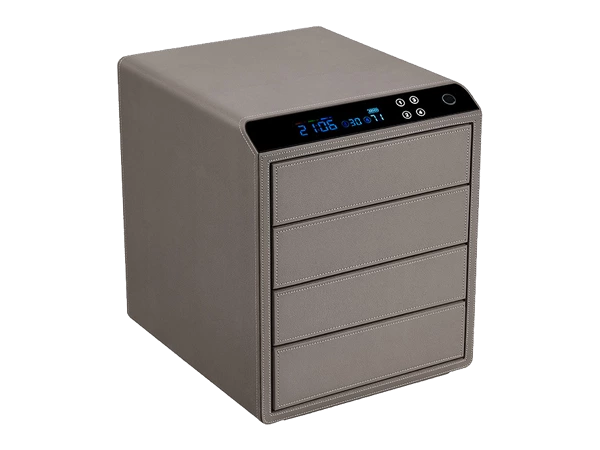
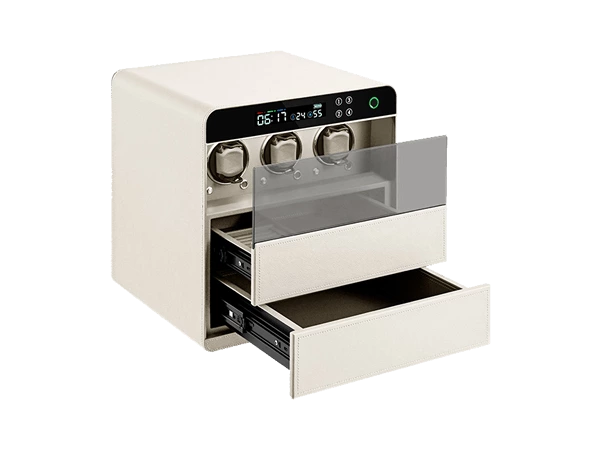
A 2 drawer leather safe cabinet is a secure storage unit designed with two separate internal sections or drawers and an exterior finished in leather, microfiber or another furniture-style material.Unlike a conventional steel safe that emphasizes a purely functional appearance, this format is intended to feel more at home in bedrooms, wardrobes, dressing rooms and executive interiors. The leather finish softens the visual appearance while the secure internal structure provides controlled access to valuables.Depending on the model, the safe may use fingerprint recognition, a digital password, a mechanical backup system or a combination of these access methods. The internal spaces can also be arranged differently depending on whether the user needs to store documents, jewelry, watches or mixed valuables.The defining advantage is the combination of secure storage, separated organization and a more refined exterior.
Why Choose Two Separate Storage Drawers?
One of the biggest practical benefits of a two-drawer layout is that different valuables do not need to share the same space.For example, the upper section can be used for watches, jewelry or cash that may be accessed regularly, while the lower section can hold passports, certificates, contracts or other documents that are used less often. This simple division can make the safe much easier to manage.A single large compartment may offer more open space, but small items can quickly become mixed together. A two-section design gives the owner a clearer way to organize belongings by type, value or frequency of use.For couples, the two drawers can also be divided between users. In larger residential projects, the same concept may be used to separate personal jewelry from documents or business-related items.
What Can You Store Inside?
The exact storage capacity depends on the dimensions and interior layout, but a 2 drawer leather safe cabinet is generally suitable for several categories of valuables.
Jewelry and Watches
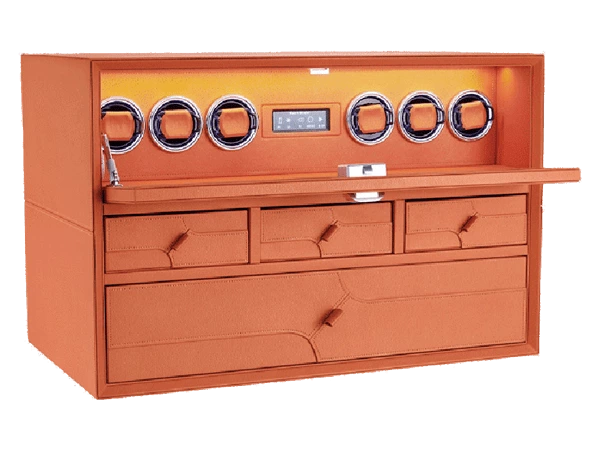
Jewelry and watches are among the most common items stored in luxury home safes.Rings, necklaces, bracelets and watches benefit from separated storage because contact between items can cause scratches or tangling. If the safe includes microfiber lining, watch cushions or jewelry trays, the internal space becomes even more practical for daily use.A leather jewelry safe can also coordinate visually with a dressing room or wardrobe interior, which is particularly important in high-end residential projects.
Documents and Passports
Passports, certificates, property documents, contracts and other personal records can be stored in a separate drawer.Before purchasing, buyers should check the usable internal dimensions. Some compact leather safes are designed mainly for jewelry and small valuables, while larger models may accommodate A4 or Letter-size documents more comfortably.For document-focused use, a leather document safe can provide a more organized alternative to keeping papers loose inside an ordinary drawer.
Cash and Personal Valuables
Cash, spare keys, memory devices, small electronics and personal accessories can also be stored inside.The advantage of a two-drawer layout is that these items can be separated from jewelry or paperwork instead of sharing one open compartment. This makes the interior easier to keep tidy and reduces unnecessary handling of valuables that do not need to be accessed every time the safe is opened.
Leather Safe Cabinet vs Traditional Metal Safe
Both products can provide secure storage, but they are designed for different environments and user expectations.
| Feature | 2 Drawer Leather Safe Cabinet | Traditional Metal Safe |
| Exterior Appearance | Refined, furniture-friendly | Functional, industrial |
| Interior Organization | Separate storage sections | Often one main compartment |
| Jewelry Storage | Very suitable with proper interior | Depends on configuration |
| Document Storage | Suitable | Suitable |
| Bedroom Integration | Excellent | Moderate |
| Wardrobe Integration | Excellent | Depends on dimensions |
| Luxury Interior Matching | Strong | More functional |
| Interior Customization | Flexible on suitable models | Depends on model |
| Daily Access | Convenient | Depends on lock and placement |
A traditional metal safe may be appropriate when appearance is not important or when a large internal volume is the priority. A leather safe cabinet becomes more attractive when the product will be placed in a visible bedroom, wardrobe or dressing area.
The choice is therefore not only about the lock. It is also about how the safe interacts with the surrounding furniture and how the contents are organized.
Why Leather Finishes Work Well in Luxury Interiors
Luxury interiors rely heavily on material consistency. Leather, microfiber, wood, stone, metal trim and soft textiles are often used together to create a more refined environment.A bare steel safe can look visually disconnected from this type of space. A leather-finished safe cabinet, by contrast, can feel closer to a piece of furniture or a premium storage accessory.Neutral colors such as beige, taupe, gray, brown or black are especially easy to coordinate with wardrobes, bedside furniture and dressing-room cabinetry. Decorative stitching can also give the product a more crafted appearance.This is one reason leather safe cabinets are attractive for luxury homes, villas, apartments and custom interior projects where the safe may remain visible rather than being fully concealed.
Where Can a 2 Drawer Safe Cabinet Be Used?
The product can work in several residential and commercial environments.
Bedroom
A bedroom is one of the most practical locations because jewelry, watches and personal documents are often stored there already.A compact leather safe cabinet can sit inside a wardrobe, beside a dressing table or within custom cabinetry without creating the appearance of an industrial security product.
Walk-In Wardrobe
A walk-in wardrobe is particularly suitable for this type of safe.The user can keep jewelry, watches, accessories and documents close to the dressing area while maintaining controlled access. If the safe is planned during the wardrobe design stage, its dimensions can be integrated more naturally into the cabinet layout.
Home Office
A home office may require secure storage for contracts, passports, cash, external drives or private documents.A leather safe cabinet can offer a more refined alternative to a conventional office filing cabinet when the user wants both security and a premium appearance.
Bedside Area
Smaller models may also work beside the bed or within a bedside cabinet.This is useful for personal valuables that the owner wants nearby without leaving them exposed on a table.
Hotel or Luxury Apartment
Hotels, serviced apartments and high-end residential developments can also use leather safe cabinets where interior appearance is part of the guest or homeowner experience.For project buyers, dimensions, lock configuration and installation method should be coordinated before ordering.
What Locking System Should You Choose?
The best lock depends on how the safe will be used.
Fingerprint Access
Fingerprint recognition is useful for frequent personal use. It allows the owner to open the safe quickly without entering a code every time.This can be especially convenient for watches and jewelry that may be accessed daily.
Digital Password
A digital password system can work well for households or projects where more than one authorized user needs access.It is also familiar to hotel and residential buyers because users generally understand how to operate it.
Combined Access
Some smart safes combine fingerprint and password functions.This gives users more flexibility and may also suit private-label or project requirements where different access preferences are expected.The lock should be selected according to actual use rather than simply choosing the model with the largest number of functions.
Is a Leather Safe Suitable for Jewelry and Watches?
Yes, provided that the interior is designed appropriately.The exterior leather finish mainly affects appearance. What matters most for jewelry and watches is the internal storage environment.
A good jewelry and watch safe should ideally provide:
- soft interior lining;
- divided compartments;
- enough space between watches;
- ring or jewelry sections;
- stable watch cushions;
- an easy-to-view layout.
For collectors, organization is especially important because watches should not be stacked or allowed to rub against one another.A dedicated safe for jewelry and watches can therefore offer a much better experience than a plain open steel compartment.
How Much Storage Space Do You Need?
The correct capacity depends on what you plan to store now and what you may add later.If the safe will mainly hold documents, check the usable width and depth. If watches are the main priority, count how many watch positions are required. For jewelry, consider whether you need ring sections, necklace compartments or removable trays.It is usually better to leave some spare capacity rather than choosing a cabinet that is completely full from the first day.For furniture-integrated projects, external dimensions are equally important. The safe needs to fit the available cabinet width, depth and height while leaving enough space for the drawers or doors to open properly.
What Is the Difference Between a Leather Safe Cabinet and a File Cabinet?
This distinction is important because the terms are sometimes confused.A traditional file cabinet is designed primarily to organize paper files and folders. Its main purpose is storage and office organization, even if it includes a basic lock.A leather safe cabinet, on the other hand, is designed as a secure storage product for valuables. It may hold documents, but it can also be configured for watches, jewelry, cash and personal items.If the product does not include dedicated hanging-file rails or file-folder structures, calling it a file cabinet may attract the wrong search audience.For high-end residential and luxury storage applications, terms such as leather safe cabinet, 2 drawer safe cabinet or lockable leather storage cabinet are usually more accurate.
Can a Leather Safe Cabinet Be Customized?
Yes, depending on the product structure and manufacturing requirements.
For custom projects, buyers may request adjustments to:
- exterior dimensions;
- drawer size;
- internal compartment layout;
- jewelry trays;
- watch positions;
- lining material;
- exterior color;
- leather or microfiber finish;
- fingerprint or password lock;
- logo;
- packaging.
For larger changes, such as structural dimensions or internal mechanisms, the manufacturer may need drawings, samples or more detailed project information before confirming feasibility.Customization is particularly valuable for wardrobe manufacturers, furniture brands and interior projects because standard safe dimensions may not always fit the available cabinetry.
Why Custom Dimensions Matter for Wardrobe Projects
Furniture manufacturers often work with fixed cabinet depths, drawer modules and panel systems.A safe that is only a few centimeters too deep can create installation problems. Similarly, a drawer that opens too far may interfere with surrounding doors or furniture.For this reason, custom wardrobe projects should confirm the safe dimensions before cabinet production whenever possible.
Useful information includes:
- available internal width;
- cabinet depth;
- usable height;
- drawer opening clearance;
- lock position;
- power requirements if applicable;
- expected order quantity.
Providing a furniture drawing can make communication much easier and reduce sample revisions.
What Should B2B Buyers Look for in a Leather Safe Cabinet Manufacturer?
For distributors, furniture manufacturers and private-label buyers, the product itself is only part of the purchasing decision.A suitable leather safe cabinet manufacturer should also be able to support product consistency, customization and clear technical communication.
Product Experience
The manufacturer should understand both safe construction and furniture-style finishing.Leather wrapping, stitching, drawer alignment and smart lock integration all affect the final quality.
Customization Capability
Buyers should confirm what can actually be changed.Some suppliers may only support color and logo customization, while others can also adjust dimensions, interior layout and locking systems.
Sample Development
Samples are useful for checking the actual appearance, dimensions and function before larger-volume production.This is especially important for custom cabinetry.
Quality Consistency
For repeat B2B orders, consistent dimensions, stitching, color and lock performance matter as much as the first sample.
OEM and ODM Support
Private-label buyers may need logo application, packaging, color changes or more substantial product development.The required level of customization should be discussed clearly before quotation.
Who Is This Type of Safe Best Suited For?
A 2 drawer leather safe cabinet works particularly well for users who want secure storage without the visual appearance of a conventional industrial safe.
Typical users include:
- homeowners with jewelry and watches;
- luxury villa owners;
- walk-in wardrobe users;
- home office users;
- interior designers;
- furniture manufacturers;
- wardrobe brands;
- safe distributors;
- hotel project buyers;
- private-label security brands.
For purely industrial or warehouse use, the leather finish may not provide much additional value. In a bedroom, wardrobe or luxury office, however, the material and appearance become much more relevant.
Common Mistakes When Choosing a 2 Drawer Safe Cabinet
One common mistake is focusing only on the exterior.A beautiful leather finish does not compensate for an interior that is too small or poorly organized. Buyers should always consider usable storage capacity and compartment layout.Another mistake is choosing the safe only by its lock. Fingerprint access may be convenient, but the product must also fit the intended installation and support the valuables being stored.Buyers should also avoid purchasing a cabinet without checking external dimensions first, particularly if it will be installed inside furniture.Finally, using the wrong product terminology can cause confusion. If the product is a secure cabinet for valuables rather than a dedicated office file organizer, marketing it primarily as a “file cabinet” may attract the wrong audience.
How to Choose the Right 2 Drawer Leather Safe Cabinet
Start with the contents.If jewelry and watches are the priority, focus on interior organization. If documents are more important, make sure the drawer dimensions are suitable for the paper sizes you need to store.Then consider placement.A bedroom or wardrobe may benefit from a compact, refined safe that blends with the furniture. A home office may require more document space.Next, choose the lock.Fingerprint access is useful for daily personal use, while digital password systems may be better for multiple authorized users.Finally, consider future capacity and customization. A safe that fits the current collection perfectly but leaves no room for growth may become restrictive later.The best product is not simply the most expensive or the most feature-heavy. It is the one that fits the room, the contents and the owner's daily habits.
Frequently Asked Questions About 2 Drawer Leather Safe Cabinets
What is a 2 drawer leather safe cabinet?
A 2 drawer leather safe cabinet is a secure storage unit with two separate storage sections and a leather or microfiber exterior. It is designed for organized storage of documents, jewelry, watches, cash and other personal valuables.
Is a leather safe good for jewelry and watches?
Yes, especially when the interior includes soft lining, divided compartments and dedicated watch or jewelry storage. The exterior leather mainly improves appearance, while the interior layout determines how practical it is for valuables.
Can documents be stored in a 2 drawer safe?
Yes, provided the internal dimensions are large enough for the documents. Buyers should check usable drawer width and depth if they need to store A4 or Letter-size papers.
Is a leather safe cabinet suitable for a bedroom?
Yes. Its furniture-style finish makes it particularly suitable for bedrooms, dressing rooms and walk-in wardrobes where a conventional metal safe may look too industrial.
What is the difference between a leather safe cabinet and a metal safe?
A leather safe cabinet is designed to combine secure storage with a more refined exterior and often more organized internal sections. A traditional metal safe usually places greater emphasis on functional storage and may have a more industrial appearance.
Can a leather safe cabinet be customized?
Depending on the manufacturer and project, dimensions, drawer layout, interior materials, lock systems, exterior colors, branding and packaging may be customized.
Can furniture manufacturers order custom safe dimensions?
Yes. Custom dimensions can be particularly useful for wardrobe and furniture integration. Cabinet drawings should ideally be provided before the safe structure is finalized.
Do manufacturers provide OEM leather safe cabinets?
Many safe manufacturers can support OEM or ODM projects depending on quantity and technical requirements. Custom branding, finishes, interiors and packaging are common areas of customization.